
USB configurator · standalone
For AG-AF, AG-RS485 and AG-RS232. With power connected, use the EMPTY / FULL buttons to calibrate empty and full reference points. No computer software is required.
AG-AF · AG-RS485 · AG-RS232
At your desk or beside the tank. Find the right connection, power source and calibration method.
Choose your configurator, then the right tool. Empty/full calibration and tank-volume calibration are different steps.
For AG-AF, AG-RS485 and AG-RS232. With power connected, use the EMPTY / FULL buttons to calibrate empty and full reference points. No computer software is required.
Connect the USB configurator to your computer and use AoooG Portable Configurator Client 5.7 to test the sensor, set parameters, and read or write tank calibration tables.
For AG-AF and AG-RS485 only; AG-RS232 is not supported. Purchase the wireless configurator separately. Read and set parameters and perform empty/full calibration through FUEL MASTER APP. These wireless-configurator operations require the app.
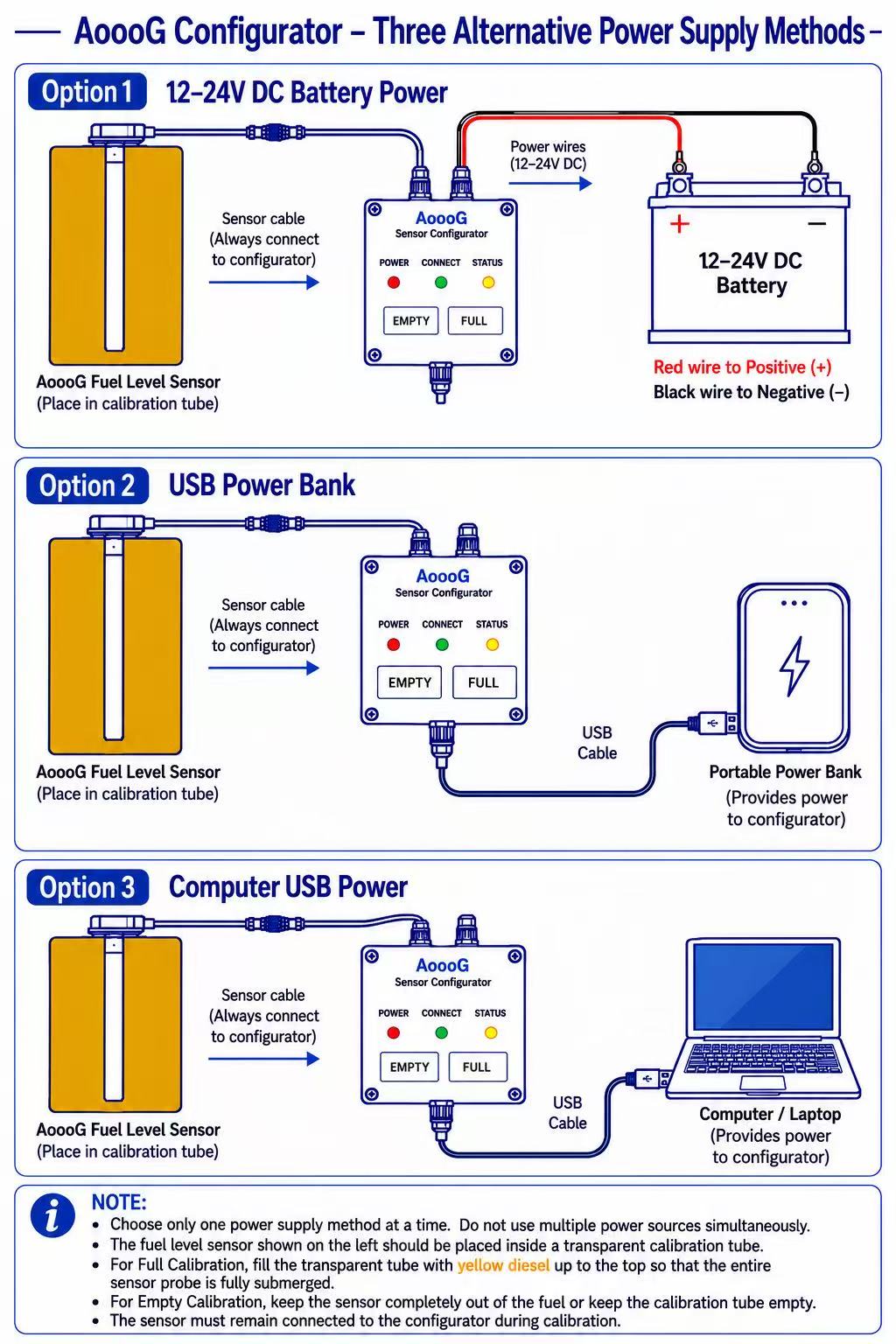
12–24V DC battery: for field calibration. Red wire to positive (+), black wire to negative (−).
USB power bank: portable power for calibration with the EMPTY / FULL buttons; no computer needed.
Computer USB: supplies power for button calibration and provides the connection for PC software configuration.
Choose only one power source at a time. Do not use multiple supplies simultaneously. Keep the sensor connected to the configurator throughout calibration.
Yes. Power the USB configurator using one of the three options and use its EMPTY / FULL buttons. For the wireless configurator, use FUEL MASTER APP.
The power bank supplies power. To set other parameters or manage calibration tables with the USB configurator, connect it to a Windows PC and use Portable Configurator Client 5.7.
No. Empty/full calibration establishes the probe reference points. A tank calibration table maps measured level to fuel volume, including for irregularly shaped tanks.